Blog
Welcome


Recent posts
SEARCH RESULTS FOR: Photojunction Retro
I was working with a client last evening sorting out their album design, and yet again marveling at PJ Remix. We were looking at what we might do with their design to take it away from the ordinary. The expression Pimp My Album came to mind ... and things went crazy! There were tassels, dice, bling, and all sorts of flame shaped graphics ... quickly recognised as possibly on the absurd side of album creativity. It did get me thinking how I might accessorise my beautiful classic album. I thought I would start a list! The obvious beginning is a case ... there are two available (three if you include To View More >>
This entry was posted in by Admin
We regret to say the fibre connection to our print lab has just been cut. As a consequence our FTP upload service has been disrupted and you will not be able to upload orders from Photojunction until it is repaired. Our lab team is also out of email and phone contact. Our Bindery staff are still able to communicate and Workspace is operating normally. We are moving staff between sites so that we can get tech support back up and running within an hour or so. We are working on this urgently and will advise when we know how long the repair will take, but we expect it to be a matter of several hours. To View More >>
This entry was posted in by Admin
Everyone has a different workflow, there's no question about it. Most wedding photographers have a shooting season and…the rest of the year. Depending on your clients, album design could be year round, but if you're lucky, you finish your album season shortly after your shooting season. The "downtime" is used for maintaining your business, small shoots, networking, and maybe taking it easier. One of the most important things to take care of during this time is organizing and backing up files. I 'm afraid album files get forgotten sometimes. I can't stress enough, you should back up your files. To View More >>
This entry was posted in by Admin

Have you had a look at our Knowledge base in Workspace? It covers not just information about Workspace, but also Photojunction, Queensberry products and our printing and design services. There are also tutorial videos to help you with various Photojunction topics. Our tech and client support teams cover lots of topics on a daily basis, and don't get me wrong, we love to hear from you, but the answer you're looking for could be just at the tips of your fingers. As they say let your fingers do the walking. If you have had a look and can't find what you need to please don't hesitate to email us at To View More >>
This entry was posted in by Admin
Things have a habit of creeping up on you, as our friends at Seldex have reminded us by sending an email to their clients reminding them that come July they won't be able to use Photojunction's cover design and Send Order functions. (We announced as much here back in February.) We've counted Seldex as friends for years – in fact they sold Queensberry albums in Australia back in the day! - so this is a rather sad time, the culmination of a process that started to unfold a couple of years ago when we realised that most suppliers weren't going to support PJ as a universal album design tool, which To View More >>
This entry was posted in by Admin
Remember the very first time you sent a letter? (Or for those who have never posted a letter - sent an email?) There were doubts - would it get there? Would strangers look at it in transit? Did I have enough postage? Did I have the right address? Do I trust the postie to take great care of my efforts? The same goes with sending orders to Queensberry through Photojunction for the first time. We need assurances that I know, as a very regular user, become less relevant with experience. Photojunction has many 'safety' features to prevent people from mucking up their orders. These safety features exist To View More >>
This entry was posted in by Admin
Danny's Last Day from Photojunction on Vimeo. Ian talks to Danny about successes and frustrations; wow features he wishes he'd plugged in the webinars; how to be a happy software user (any software); how and why PJ differs from layout programs like InDesign; and why you can depend on the PJ support and development teams. To View More >>
This entry was posted in by Admin
I have taken up a temporary position helping out with the Photojunction support team. One thing that I have noticed is that people seem to have more problems with the mechanics of Photojunction not fitting into their own experience or habits. Hardly ever does anybody ask for design advice. I wonder if it is the same with photography. People will ask about technical things like lighting and composition but much less often about content and emotion. ARE WE TOO SHY? I don't think so! As photographers we are called upon to be the creative voice for our clients. Is it that we don't like to ask for help? To View More >>
This entry was posted in by Admin
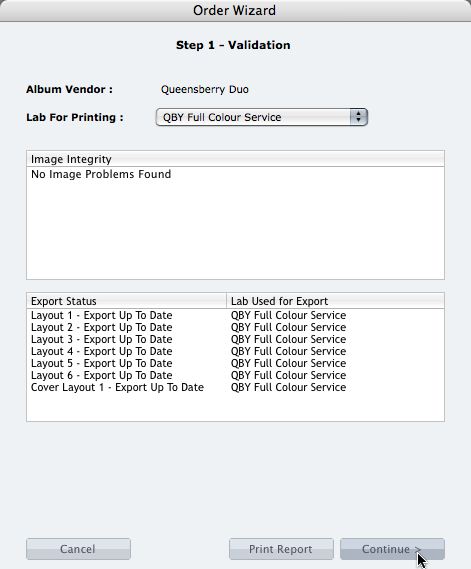
We're describing the perfect way to send us your print-and-bind order... After exporting your files you definitely shouldn't jump straight to LabFTP and send us the files - we wouldn't know what to do with them! Instead, always use the Remix Order Wizard. (You'll find it under the Album menu). Remix will validate your order and create an order "bundle" that contains everything we'll need to process your order - provided you follow these instructions: 1. Run your order through the Send Order Wizard. You'll find a tutorial here. The Wizard will ask what service you want (eg Print & Assemble) To View More >>
This entry was posted in by Admin
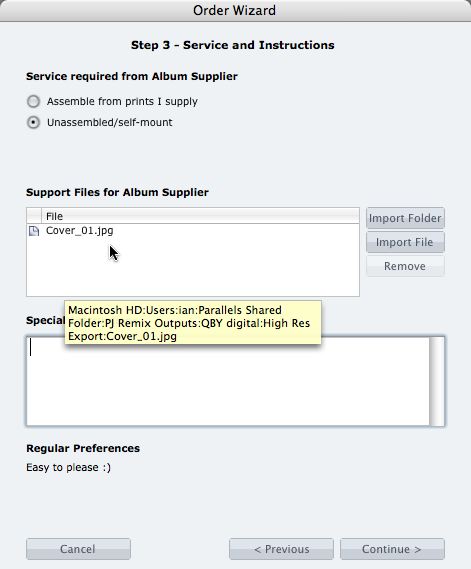
What if you want us to print your cover image, but nothing else? 1. When you fire up the Remix Order Wizard , choose either the "Assemble From Prints Supplied" or Don't Assemble" option. 2. On the same screen the Wizard will offer a place to include "support files" for your album supplier. Open your folder of High-Res Export files and drag in a copy of the cover image (don't double up by sending it to your lab to print as well). 3. Remix may ask you if you want us to print the cover image (generally it'll be obvious what you want, in which case Remix won't ask). Be sure to say Yes. 4. When the To View More >>
This entry was posted in by Admin